

How to Photograph a Small Apartment So It Looks Bigger
A few tricks that turn 35 m² into a space that doesn’t look cramped in photos, and why they matter even more for small apartments than for large ones.
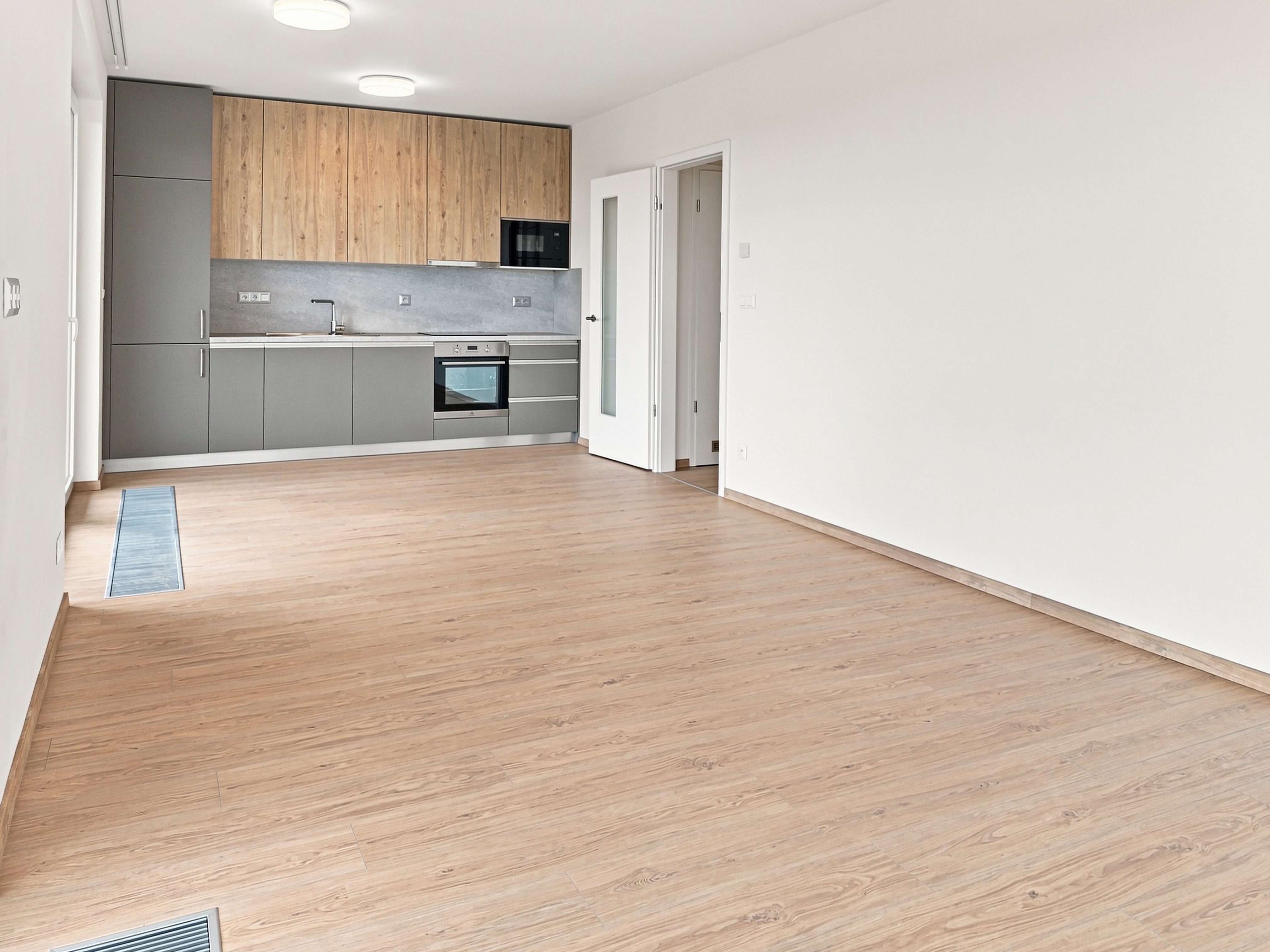
For a small apartment, photos matter even more than for a large property. Someone searching for a smaller place often compares dozens of similar listings side by side. If a photo gives the impression that the apartment is cramped, they will skip it, even if the layout is actually practical and spacious. The good news is that the difference between a photo that shrinks an apartment and one that shows it at full size doesn’t come from any trick or edit. It comes down to a few decisions you make before you press the shutter.
Shoot from the corner, not from the wall
The most common mistake in small rooms is shooting straight at the wall with your back pressed against the opposite one. The result shows the width of the room but not its depth, and depth is exactly what the human brain reads as “spacious”.
The solution is simple: stand in a corner of the room and shoot diagonally toward the opposite corner. This brings more walls and more perspective into the frame at once, which naturally adds depth to the space. This one step, moving from the wall to the corner, often makes a bigger difference in a small room than anything else in this article.
The fewer things in the frame, the more spacious it feels
In our previous article we wrote that thorough cleaning is the foundation for every property. In a small apartment, though, it’s not only about cleanliness but about how many things are visible. Every extra piece of furniture and every pile of items on a countertop or shelf takes up a proportionally larger part of the frame in a small room than in a big one, and visually makes it smaller.
Before shooting, it pays to walk through the room and temporarily clear away everything that isn’t essential for the photo: the clothes airer, chargers and cables, piles of mail, and extra chairs that fit in the room but make it look overcrowded in the picture. You don’t have to get rid of the furniture itself. It’s only about what is visible at the moment you take the photo.
Light makes a space look bigger
A dark room always looks smaller than it really is. In dim light, the eye has a much harder time guessing where the boundaries of a space are. So before shooting, switch on all the available lights in the room, even those you would normally leave off, and open the curtains or blinds fully.
If the room has a window, try a shot that also shows the view outside. Looking out into open space tells the brain that the room doesn’t simply end at the edge of the photo, which is especially effective in small apartments. If there is a garden, terrace or balcony outside, feel free to leave the balcony door open too. The outdoor space then visually becomes part of the room.
At the same time, watch the contrast between a bright window and the rest of the room. If the window is completely blown out to white, the eye loses the natural point where the space continues, and the room feels more enclosed instead. Archir balances this automatically during processing, but it also helps to shoot at a moment when the contrast between the light outside and inside isn’t extreme.
Leave the doors between rooms open
A small apartment often feels bigger not because of one particular room, but because the spaces visibly connect in the photo. If the layout allows, leave the door to the neighbouring room or hallway open while shooting. A view that continues beyond the edge of the frame gives the impression that the apartment has more space than you can see in a single photo.
The same principle works for smaller details: a sliding balcony door pushed open or a bathroom door left ajar. Use it wherever it makes sense and doesn’t look distracting.
If a door to the next room can’t be opened fully for some reason, perhaps because of furniture behind it, open it at least halfway. Even a partly open door works much better than a closed one, because the eye still catches a bit of the space behind it.
Furniture slightly away from the wall, not right against it
A small detail that is easy to overlook: if possible, move key pieces of furniture a few centimetres away from the wall instead of placing them exactly against it. This creates a subtle shadow and separation between the furniture and the wall, which adds depth to the shot. Furniture pushed right up against the wall, on the other hand, visually “glues” the whole surface into a single plane, and the room looks flatter.
Shoot at 1× zoom
The iPhone offers several zoom options: put simply, the 0.5× ultra-wide, the main 1× lens and the telephoto (2× or 3×, depending on the model). For property photos, the main lens at 1× is the right choice. It is the zoom closest to how the human eye sees a space, so the photo looks natural and pleasant. At Archir, we always shoot at 1×.
By the way, if you tilt the phone slightly up or down while shooting, vertical lines (wall corners, door frames) converge in the photo, which can visually distort a small room. Archir straightens this automatically during processing, so you don’t need to worry about it while shooting. It is still good to know if you also process your photos some other way than through the app.
With small rooms, there is sometimes a temptation to switch to the 0.5× ultra-wide so that “more fits” into the frame. It’s better to avoid this. An ultra-wide and especially a fisheye lens makes a space look artificially larger than people actually perceive it: corners and edges visibly curve, and the room looks considerably bigger than it really is. In the short term it may win a click, but in the long term it is a risk. A prospective buyer or tenant who arrives for a viewing and finds that the apartment doesn’t match what they saw in the photos loses trust not only in the photos but also in the agent who posted the listing.
The goal of this set of tricks is to show the apartment at its real size as well as possible, not to create an impression that falls apart at the viewing. That is exactly why Archir doesn’t use generative AI or aggressive perspective distortion: speed and quality, yes, but the reality that the viewer then sees with their own eyes has to match.
Corner instead of wall, fewer things in the frame, all the lights on, open doors between spaces, a bit of distance between furniture and the wall, and shooting at 1× zoom. None of these steps takes more than a few extra minutes, and together they can make a small apartment look in photos exactly as big as it really is.
Do you like this type of article? Follow us on Instagram or subscribe to our newsletter. Next time we’ll look at how natural and artificial light differ when photographing interiors, and when it’s better to reach for the latter.